Growing
QR Code Donations: How to Use Yours in Real Life
Every Pennygood volunteer gets a personal QR code that links directly to their page. Scan it, read the story, chip in — in under a minute, without an account. Here's how to actually put it to work.
By The Pennygood team · May 2026 · 9 min read
Every Pennygood volunteer gets a personal QR code that links directly to their page. Scan it, read the story, chip in — in under a minute, without an account. Here's how to actually put it to work.
Why QR codes matter for volunteers
Most support platforms live entirely online. Your page exists somewhere on the internet, and people find it through links, social media, or search. That's fine, but it misses the most powerful moment of all: when someone sees you doing the thing in person.
A QR code turns that moment into an immediate action. Someone watches you lead a free fitness session in the park, feels good about it, wants to support you — and your code is right there. No need to remember a URL, no need to follow you on Instagram first. Scan, done.
The physical-to-digital bridge is where Pennygood codes do something that purely online platforms can't.
Where to put your QR code
On your clothing. This is the highest-impact placement. A small printed patch or iron-on label on the back of a jacket, a volunteering vest, or a t-shirt. When you're actively doing your thing, your code is visible to everyone around you. Keep it simple: the QR code, your name, and "Support my work" is enough.
At your activity location. A laminated card on a community board, attached to the equipment you bring, or placed at a table where people gather. A4 size works well for outdoor boards. A6 (postcard size) works for tables and counters.
On a physical card. Business card size, handed out personally. "This is what I do, if you want to support it" is all the context you need. Cheaper than you think — most print services do 100 cards for under $10.
In your social media bio. Instagram, TikTok, and Twitter/X all support links in bios. Some platforms (notably Instagram) only allow one link — use your Pennygood page URL directly, or a link aggregator if you have multiple links to share.
On a poster for your activity. If you organise recurring events — classes, clean-ups, meetups — a simple poster with your QR code at the bottom keeps the option present for anyone who sees it. Libraries, community centres, and cafés often have boards where you can post these for free.
On your equipment. If you bring things to your activity — tools, mats, bags, a trolley — your code on a label there reaches people who might not notice you wearing it.
How to print it well
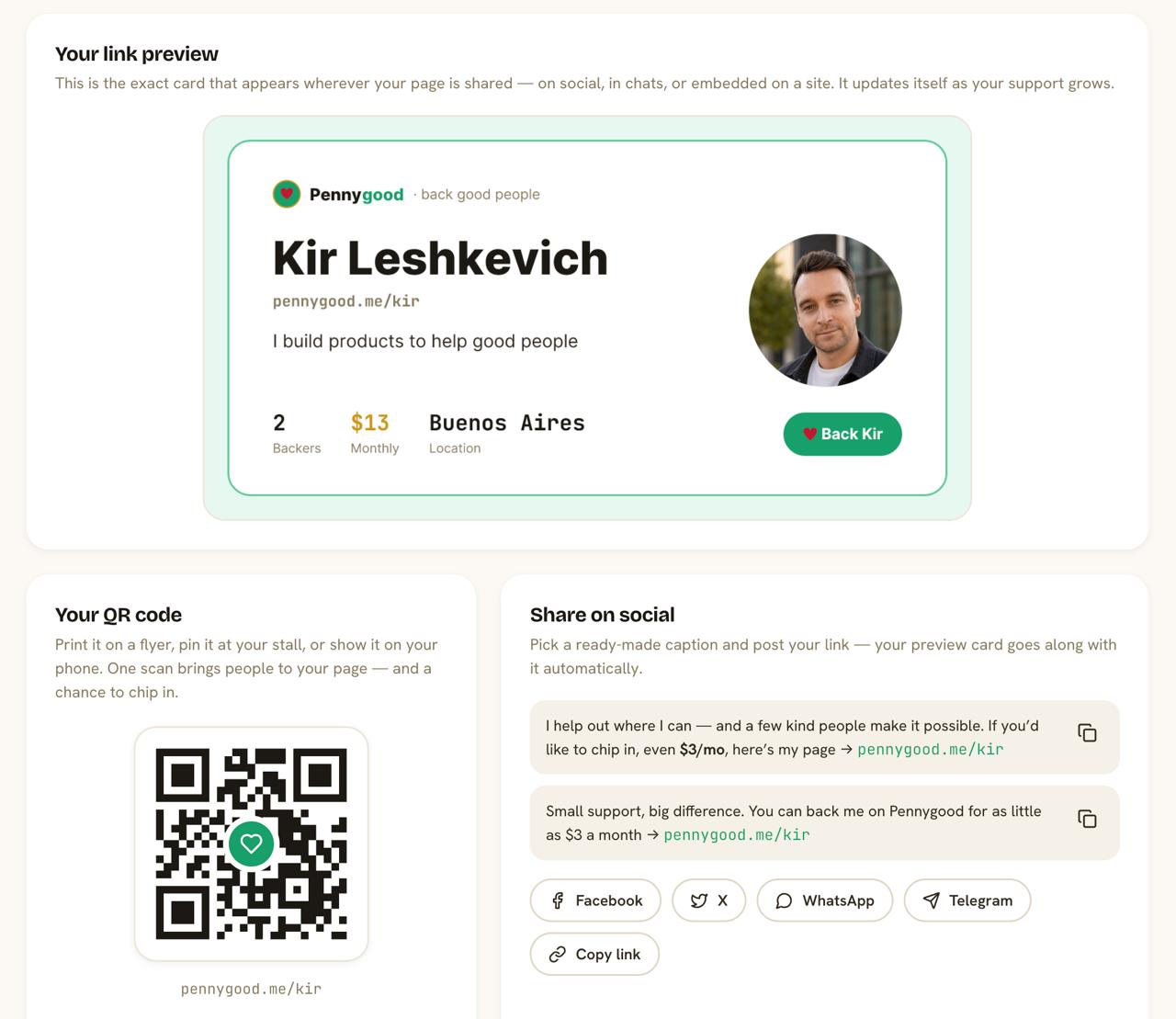
Download your QR code from your Pennygood dashboard as a high-resolution PNG or SVG. For anything larger than a business card, use the SVG version — it scales without losing quality.
For clothing: look for iron-on transfer paper (available at most office supply stores) or use a local print shop that does custom patches.
For cards and posters: any online print service (Vistaprint, Moo, local printers) will work. Keep the design simple — a busy design around the QR code makes it harder to scan.
Minimum size for reliable scanning: 2.5cm × 2.5cm (about 1 inch square). Smaller than that and some phones struggle, especially in low light.
What to say next to your code
Context matters. "Scan to donate" is fine but generic. Something more specific works better:
- "I clean this park every Sunday. If you like it here, this is how you can help keep it happening."
- "Free yoga, every Tuesday. Chip in if you can."
- "This is what I do in my spare time. Support welcome."
Short, specific, honest. No pressure language. Just an invitation.
What happens when someone scans it
They go directly to your Pennygood page. They see your photo, your story, your backer count, your progress toward your ask. They can choose to back you monthly or make a one-time contribution — without creating an account. The whole flow from scan to completed payment takes about 90 seconds.
A few practical notes
Check your QR code still works after printing. Sounds obvious, but worth doing before you distribute 100 cards.
Direct sunlight on laminated cards can sometimes create glare that makes scanning harder. Matte lamination works better outdoors than glossy.
Your Pennygood URL never changes, so a QR code you print today will work indefinitely. No need to reprint unless you want to update the design.
Get your QR code from your dashboard →